Open source. Local-first. Terminal-native.

au tells you what your agent CLI is doing before you burn time guessing.

It reads the signals already on your machine and turns them into one compact answer: logged in or not, plan or API mode, current usage context, and whether a quota window is about to bite you.

Install with one command

curl -fsSL https://raw.githubusercontent.com/supdub/au/main/install.sh | bash
au -v
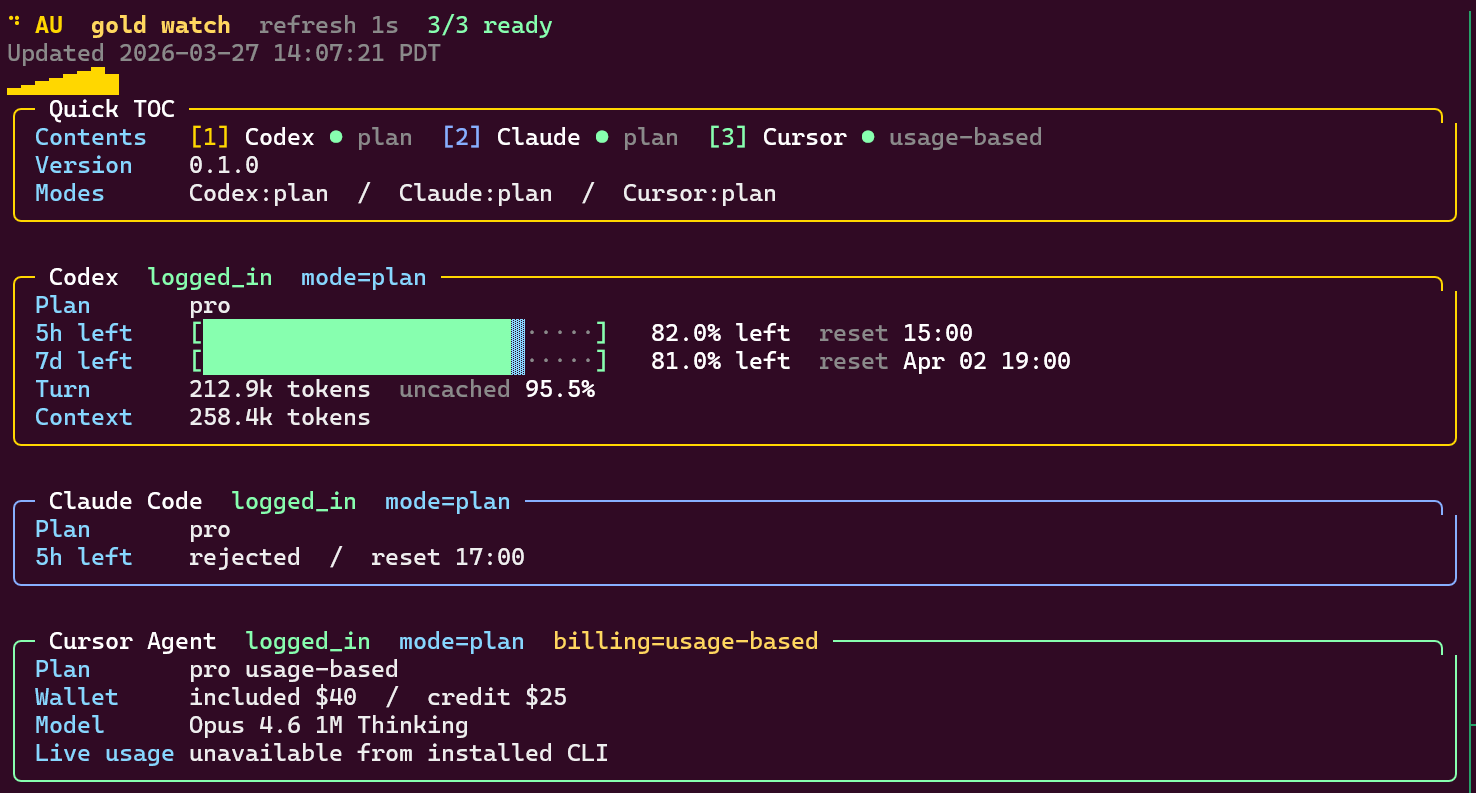
Real watch-mode screenshot
au watch mode screenshot showing Codex, Claude, and Cursor panels

Download paths

Default to the published release, and opt into `main` only when you want the latest unreleased changes.

Stable by default: install.sh

`install.sh` is the default path here. It pulls from the latest published release and chooses the matching macOS/Linux asset when one is available.

curl -fsSL https://raw.githubusercontent.com/supdub/au/main/install.sh | bash
au -v

Optional: track `main`

Use the main branch when you want the newest repo state before the next tagged release. This path is intentionally opt-in.

python3 -m pip install --upgrade "git+https://github.com/supdub/au.git@main"
au -v

What it is useful for

au is for the moment before you start a serious session.

Check whether you are actually authenticated

Stop discovering halfway through a run that the local client fell back to a missing login state or an expired session.

See plan mode versus API mode clearly

Environment overrides and CLI behavior can quietly change what usage means. `au` makes that explicit.

Estimate session risk before a long task

When a quota window is nearly exhausted, that is operationally important. `au` surfaces the reset timing instead of making you infer it.

What it reads

No dashboards in the cloud. No separate account sync.

Codex

Local auth files, config, and session artifacts already present on your machine.

Claude Code

Credential state, local session traces, and live CLI-exposed rate-limit signals when available.

Cursor Agent

Auth state and local billing metadata so the usage story is grounded in actual account context.

Output shape

Compact JSON for scripts, plus a watch dashboard for humans who keep a terminal open all day.

Who it helps

Useful when the CLI is doing real work and the surrounding state has become ambiguous.

Good fit for

  • people hopping between plan and API-backed workflows
  • teams debugging auth, quota, or billing confusion on local machines
  • automation that needs a compact machine-readable status snapshot
  • terminal users who want a live, low-noise dashboard instead of a log stream

Not trying to be

  • a hosted analytics product
  • a billing source of truth for providers that do not expose totals locally
  • a wrapper that changes how Codex, Claude, or Cursor fundamentally work
  • a surveillance layer that ships local session data elsewhere

First commands

Once installed, the first check should be almost immediate.

Typical questions

au -v
au
au codex
au claude
au cursor
au -p

Useful habit

au -w

# keep it open before or during a longer session